The words change
The title, the ingredient names and the steps, in the words a cook in that language would use: aubergine or eggplant, whichever the language says.
RecipeGo › Translate a recipe
Guide
A French blog read in English. Your grandmother's recipe in Gujarati, read in English by your kids. A Japanese video recipe in Spanish. RecipeGo translates the whole recipe, every ingredient and every step, and leaves the amounts exactly as they were written.

Translation is part of RecipeGo Pro PRO
Paste a link from any recipe site, share a YouTube, TikTok or Instagram post, photograph a cookbook page or a handwritten card, or paste the text. It can be in any language.
Open the recipe and tap the globe at the top. Languages are listed by their own names, so look for Español, हिन्दी or 中文.
The title, ingredients and steps change language. Tick “Use this language everywhere” to read every recipe in it, or leave it for just this one.
The translation follows the recipe into cook mode and the meal plan. Cook mode can read each step aloud in that language too, if your phone has a voice for it.
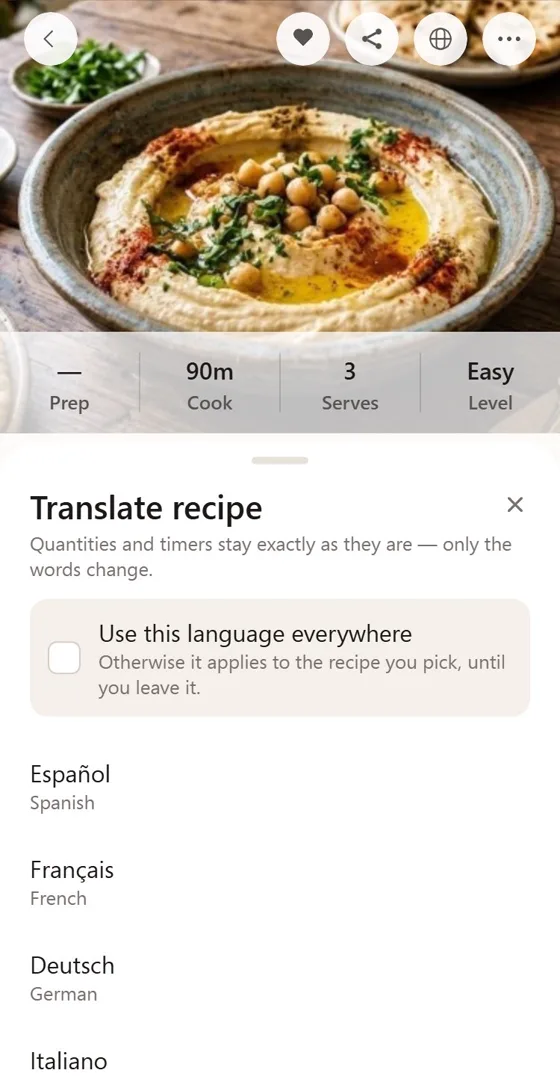
A translated recipe has to cook the same as the original.
The title, the ingredient names and the steps, in the words a cook in that language would use: aubergine or eggplant, whichever the language says.
Quantities and timers stay exactly as written. A translation never quietly turns 200 g into a cup.
Switching between US and metric, or °F and °C, is its own setting under Units and Measurements. It's free, and it works on any recipe, translated or not.
A translation is laid over the recipe, never written into it. The original is one tap away, and editing the recipe makes a fresh translation.
English, Spanish (Español), French (Français), German (Deutsch), Italian (Italiano), Portuguese for Brazil and Portugal (Português), Dutch (Nederlands), Polish (Polski), Swedish (Svenska), Turkish (Türkçe), Russian (Русский), Ukrainian (Українська), Arabic (العربية), Hebrew (עברית), Hindi (हिन्दी), Bengali (বাংলা), Gujarati (ગુજરાતી), Marathi (मराठी), Tamil (தமிழ்), Telugu (తెలుగు), Kannada (ಕನ್ನಡ), Malayalam (മലയാളം), Punjabi (ਪੰਜਾਬੀ), Odia (ଓଡ଼ିଆ), Urdu (اردو), Chinese in Simplified (简体中文) and Traditional (繁體中文) characters, Japanese (日本語), Korean (한국어), Thai (ไทย), Vietnamese (Tiếng Việt), Indonesian (Bahasa Indonesia) and Tagalog.
Save the recipe to RecipeGo from its link, a photo or pasted text, open it, tap the globe at the top and pick a language. The title, ingredients and steps change language; the quantities, units and timers stay as they were.
Yes. Photograph the page, or several pages of one recipe, and RecipeGo reads it into a recipe first. Then translate it like any other. Neat handwriting works too.
No. Only the words change. To switch between cups and grams, or Fahrenheit and Celsius, use Units and Measurements in RecipeGo's settings, which works on any recipe, translated or not.
Yes. A translation is laid over the recipe, never written into it, so the original is always one tap away.
Translation is part of RecipeGo Pro, at $4.99 a month or $29.99 a year. The app itself, and saving and cooking recipes, are free. See pricing.
Not yet. RecipeGo's buttons and menus are in English; the recipes are what get translated.

Free on iPhone and Android. Translation comes with Pro.