The creator's written recipe
When the caption links the creator's own recipe page, RecipeGo uses that page. The amounts are exact, and most of the time no AI is needed, so nothing comes off your allowance.
RecipeGo › Save recipes from TikTok and Instagram
Guide
That recipe you saved on TikTok is now somewhere in a pile of saved videos. Share it to RecipeGo instead and you get a real recipe: the ingredients and steps written out, ready to scale, cook from, plan for the week and add to your shopping list.

The same four steps for TikTok, Instagram reels and posts, YouTube, Facebook and Pinterest.
A TikTok, an Instagram reel or carousel, a YouTube video or Short. It has to be public.
Tap Share and pick RecipeGo. Or tap Copy link, open RecipeGo, tap the + at the bottom and paste it into “Paste a link from anywhere”.
RecipeGo reads the recipe and shows it to you first, with a link back to the post. Fix anything that looks wrong, then tap Save. Nothing reaches your library until you do.
Scale it to the people at your table, cook it one step at a time with timers, put it on a day of the week and add the ingredients to your shopping list in one tap.
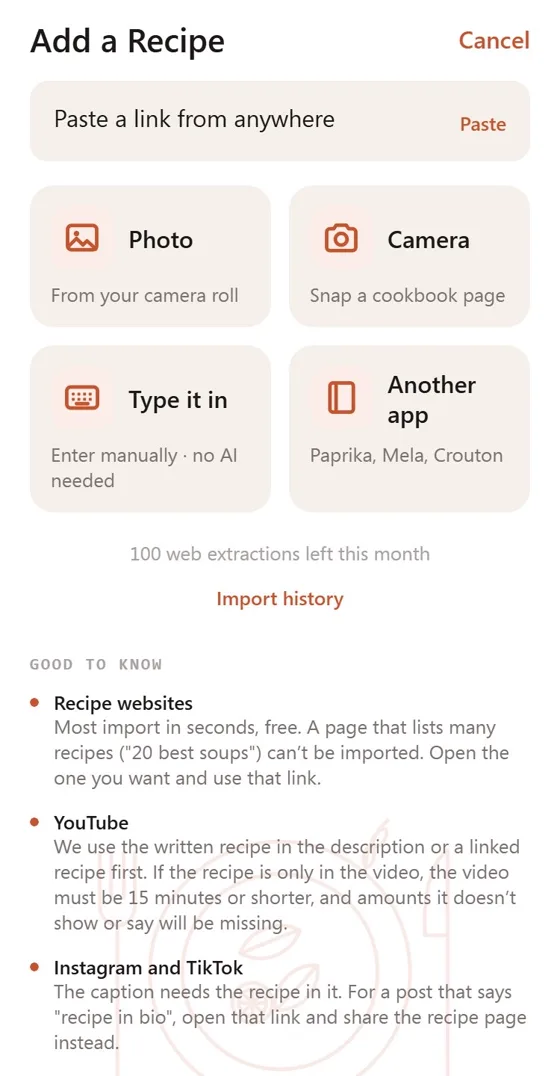
A post has no recipe card, so RecipeGo looks where creators actually put the recipe, best source first.
When the caption links the creator's own recipe page, RecipeGo uses that page. The amounts are exact, and most of the time no AI is needed, so nothing comes off your allowance.
On a lot of recipe posts the caption is the recipe. RecipeGo turns it into ingredients and steps. That is an AI import, and you confirm before it runs.
A caption that only points somewhere else has no recipe to read, so RecipeGo tells you instead of inventing one. Open the link in the creator's bio and share that page.
For a TikTok or Instagram video with no written recipe, take a screenshot of the ingredients and import the photo, or paste the text. On YouTube, RecipeGo can watch videos up to 15 minutes long.
Yes. In TikTok, tap Share on the recipe post and choose RecipeGo, or copy the link and paste it into RecipeGo. RecipeGo reads the recipe the creator wrote in the caption, or the written recipe the post links to, and shows it to you to check before it is saved.
Yes, the same way: share the reel or post to RecipeGo, or paste its link. The post has to be public. Private accounts, and posts that need you to be signed in, cannot be read.
Then there is no recipe in the post to read, and RecipeGo says so rather than guessing. Open the link in the creator's bio and share that recipe page to RecipeGo instead. You can also take a screenshot of the recipe and import the photo, or paste the recipe text.
No. It saves the recipe itself, the ingredients, steps and times, with a link back to the original post and the creator's name.
RecipeGo is free to download. Reading a caption is an AI import: the free plan includes 10 a month until 31 December 2026, then 5, and Pro includes 100 a month. A post that links to a written recipe page is usually read for free. If no recipe is found, nothing is used. See pricing.

Free on iPhone and Android.